



19 Jan Snort on pfSense – IPS Policy Accuracy
Snort on pfSense – IPS Policy Accuracy
Minimize the number of false positives and unintended enforcement of policies
The current implementation of Snort on pfSense requires a manual adjustment of the preprocessor and decoder rules when utilizing Snort VRT IPS Policies (Connectivity, Balanced, Security, and Max-Detect). This step is recommended to minimize the number of false positives and the unintended enforcement of policy, irrespective of the chosen IPS Policy level.

A special thanks to the Snort Team and Research Engineers at CISCO Talos, as well as Max Leighton and Kimberly Keen from Netgate, for their invaluable help in compiling the information required for this article.
Manual adjustment of the preprocessor and decoder rules
Category Selection
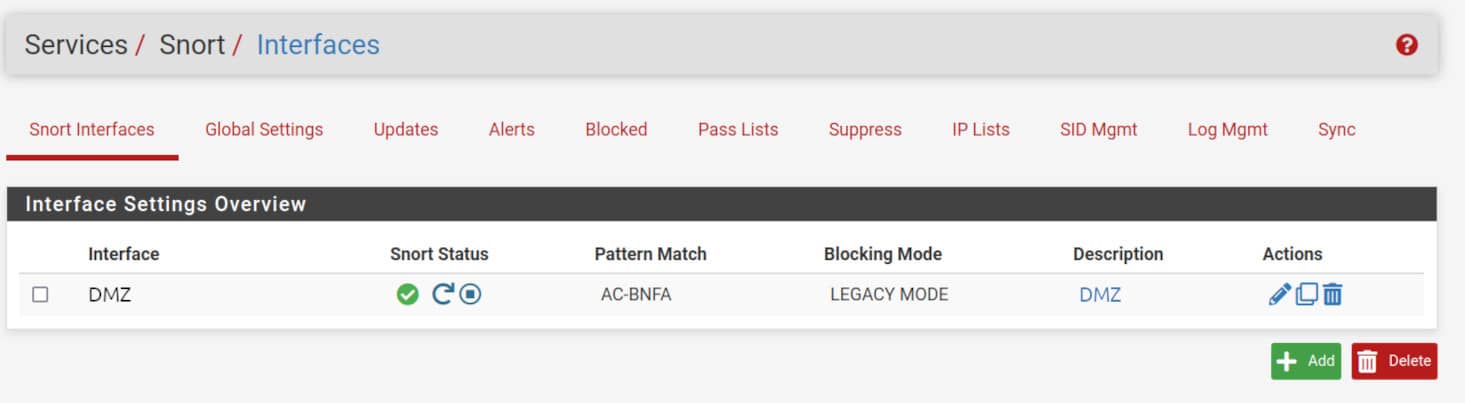
To change the preprocessor and decoder rules for a Snort interface, navigate to Services -> Snort -> Snort Interfaces then edit the interface settings clicking on the pencil symbol ✏️
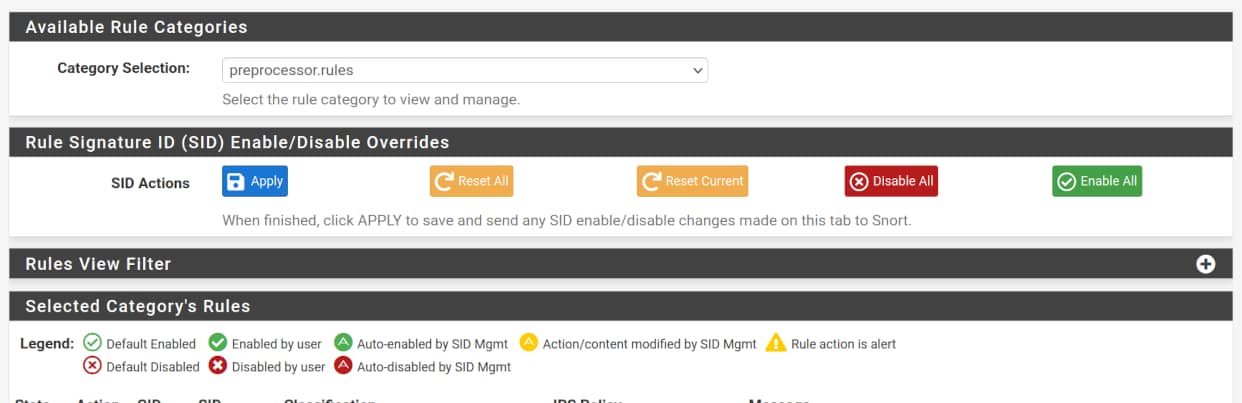
Navigate to the <Snort_Interface> Rules Tab, and then to Category Selection in the Available Rule Categories section. Here, you can choose between preprocessor.rules or decoder.rules, based on the category you need to adjust.
Policy Adjustments
Connectivity
This IPS Policy require all preprocessor or decoder rule to be disabled.
➡️ Select preprocessor.rules in the Category Selection list, then click the “Disable All” red button.
➡️ Repeat the same for decoder.rules.
Balanced
This IPS Policy require all decoder rule to be disabled and only four preprocessor rules enabled.
➡️ Select decoder.rules then click the “Disable All” red button.
➡️ Then, for the preprocessor.rules make sure only the policies in the table below are enabled.
| Group ID | Signature ID | Classtype | Message |
|---|---|---|---|
| 105 | 1 | trojan-activity | BO_TRAFFIC_DETECT |
| 105 | 2 | trojan-activity | BO_CLIENT_TRAFFIC_DETECT |
| 105 | 3 | trojan-activity | BO_SERVER_TRAFFIC_DETECT |
| 105 | 4 | trojan-activity | BO_SNORT_BUFFER_ATTACK |
Security
This IPS Policy require all decoder rule to be disabled and 22 preprocessor rules enabled.
➡️ Select decoder.rules then click the “Disable All” red button.
➡️ Then, for the preprocessor.rules make sure only the policies in the table below are enabled.
| Group ID | Signature ID | Classtype | Message |
|---|---|---|---|
| 105 | 1 | trojan-activity | BO_TRAFFIC_DETECT |
| 105 | 2 | trojan-activity | BO_CLIENT_TRAFFIC_DETECT |
| 105 | 3 | trojan-activity | BO_SERVER_TRAFFIC_DETECT |
| 105 | 4 | trojan-activity | BO_SNORT_BUFFER_ATTACK |
| 106 | 3 | bad-unknown | RPC_LARGE_FRAGSIZE |
| 106 | 4 | bad-unknown | RPC_INCOMPLETE_SEGMENT |
| 106 | 5 | bad-unknown | RPC_ZERO_LENGTH_FRAGMENT |
| 124 | 1 | attempted-admin | SMTP_COMMAND_OVERFLOW |
| 124 | 2 | attempted-admin | SMTP_DATA_HDR_OVERFLOW |
| 124 | 3 | attempted-user | SMTP_RESPONSE_OVERFLOW |
| 124 | 4 | attempted-admin | SMTP_SPECIFIC_CMD_OVERFLOW |
| 124 | 7 | attempted-admin | SMTP_HEADER_NAME_OVERFLOW |
| 124 | 8 | attempted-admin | SMTP_XLINK2STATE_OVERFLOW |
| 124 | 15 | attempted-admin | SMTP_AUTH_COMMAND_OVERFLOW |
| 125 | 3 | attempted-admin | FTPP_FTP_PARAMETER_LENGTH_OVERFLOW |
| 125 | 5 | attempted-admin | FTPP_FTP_PARAMETER_STR_FORMAT |
| 125 | 6 | attempted-user | FTPP_FTP_RESPONSE_LENGTH_OVERFLOW |
| 126 | 1 | attempted-admin | FTPP_TELNET_AYT_OVERFLOW |
| 128 | 1 | attempted-admin | SSH_EVENT_RESPOVERFLOW |
| 128 | 2 | attempted-admin | SSH_EVENT_CRC32 |
| 128 | 3 | attempted-admin | SSH_EVENT_SECURECRT |
| 131 | 3 | attempted-admin | DNS_EVENT_RDATA_OVERFLOW |
Max-Detect
If you choose this Policy, all rules from both the decoder and preprocessor rule-set shall be enabled.
➡️ Select preprocessor.rules in the Category Selection list, then click the “Enable All” green button.
➡️ Repeat the same for decoder.rules.